
carp_aware_package adds an Apple Watch as a data source to a
CARP Mobile Sensing (CAMS) study. The watch collects
motion, heart rate, location, sound and more while the participant wears it
(including when the phone app is closed) and hands the data to the phone a few
times an hour.
The flutter sampling package wraps the
AWARE watchOS
sensing framework by Yuuki Nishiyama (The University of Tokyo).
What it collects
Nine measure types, withindk.carp.watch.aware namespace:
Every field of every type is documented in Measure Types & Data.
No raw audio ever leaves the watch. Sound sensing produces a decibel number and a
classification label where the recording itself is analysed on the watch and discarded.
How it works
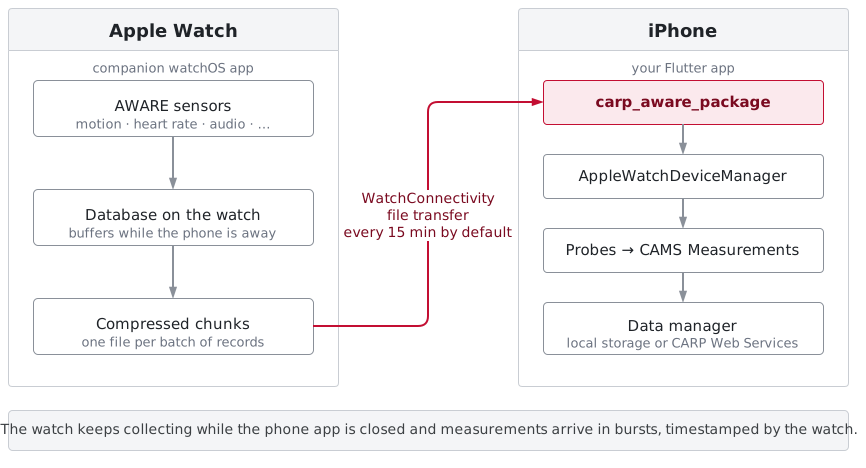
Data transfer
The watch buffers locally and transfers every 15 minutes by default.
Each record includes the timestamp given by the watch.
Background collection
The watch keeps collecting when it is out of range, and when the phone app has
been killed. iOS wakes your app in the background to receive the files.
Protocol configuration
Sampling rates and which sensors run are part of the study protocol. Deploying
a new protocol from CARP Web Services reconfigures the watch.
Requirements
Where to start
Install & Configure
Add the dependency and prepare the iOS project
Quickstart
A complete study protocol with an Apple Watch in it
The Watch App
Add the companion watchOS app — the required step
Configuring the Watch
Every setting on
AppleWatchDevice, and what it costsCredits
The watchOS sensing framework wrapped by this package iscom.awareframework.ios.sensor.applewatch
by Yuuki Nishiyama (The University of Tokyo), available under the Apache License 2.0.
If this framework supports your research, please cite:
Y. Nishiyama and K. Sezaki, “Smartwatch-Based Sensing Framework for Continuous Data Collection: Design and Implementation”, UbiComp/ISWC ‘23 Adjunct, pages 620–625, ACM, 2023.