
carp_aware_package receives data from an Apple Watch.
The collecting is done by a companion watchOS app that runs the AWARE sensors. That
app is a watchOS target inside your Flutter app’s Xcode project, and you add it once.
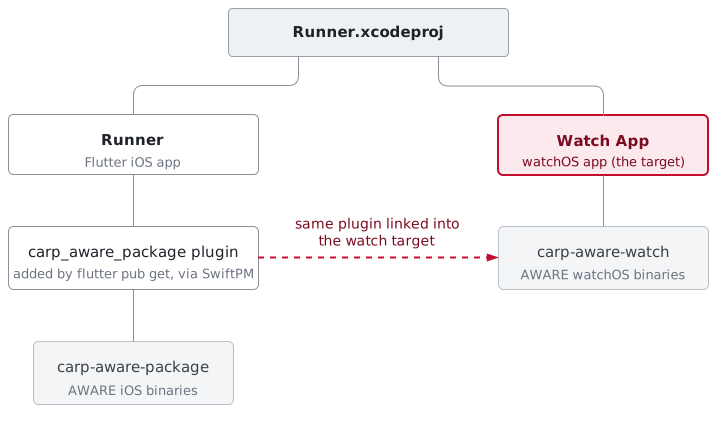
One Xcode project, two targets — and where the AWARE binaries come from
carp-aware-package automatically, and you link carp-aware-watch into the watch
target manually.
How the two apps communicate
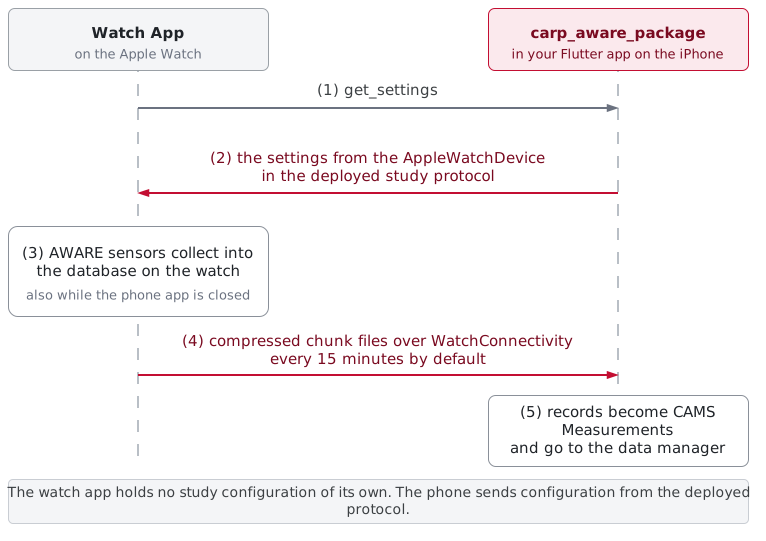
The watch asks; the phone answers from the deployed study protocol
AppleWatchDevice.
Watch app setup
1. Add the target
Create the watchOS app target, set the bundle identifiers, and link the AWARE
framework into it
2. Capabilities & permissions
HealthKit, background modes, and the privacy strings watchOS requires before it
will ask the participant for anything
3. The watch app
A simple SwiftUI app on the watch that asks the phone for settings and collects AWARE sensors