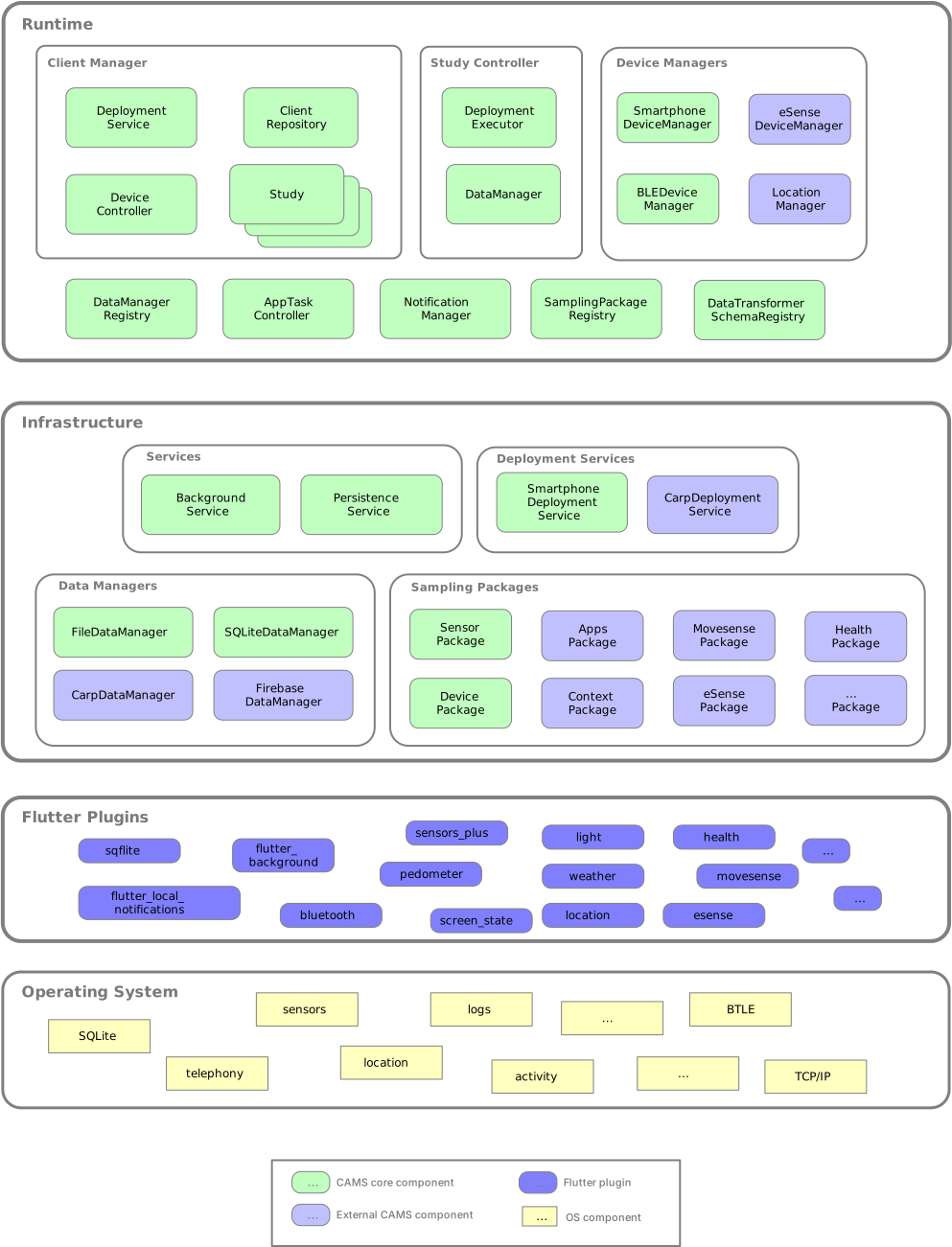
The figure below illustrates the overall runtime architecture of CARP Mobile Sensing (CAMS). The architecture consists of three main layers:
This architecture is designed to achieve the non-functional software architecture goals of being highly extensible, cross-platform, and maintainable.
Runtime
The runtime layer is the main entry point to CAMS and holds the client manager, study controllers for each running study, device managers, and a set of controllers and registries.
All classes marked with * are singletons and can hence be accessed throughout the app.
A study can be deployed. This entails that the study deployment is fetched from the deployment service and added to the study controller. The study deployment described what data to collect and which data manager to use for data upload and/or transformation. Once a study is deployed, data sampling can be controlled by resuming or pausing all studies in a client. This can also be done per study, by using the resume and pause methods on the SmartphoneStudyController. The data sampled is stored or uploaded by the data manager associated with a study (as available in the study controller).
Since CAMS keeps the state of data sampling persistently across app restart, you only need to follow the flow above once when you add a (new) study. Once a study is added and deployed, the runtime status of the study is saved and is restored automatically when the app is restarted (e.g., based on a OS-level kill of the app). Read more about background sensing. Infrastructure
The infrastructure layer holds a set of services for getting study deployments, collecting data, and storing it. The most important part is the set of sampling packages, which are described in more details in this scientific paper.
CAMS comes with two built-in sampling packages (DeviceSamplingPackage and SensorSamplingPackage), but most sampling packages are external and included as needed. In this way, an app only requests permissions for the probes and sensors it actually uses.A sampling package always collect data from a device, including external devices, like the Polar heart rate monitors. In this case it uses a PolarDeviceManager for data collection.Such devices can also be online services, such as WeatherServiceManager, as available in the carp_context_package. Plugins
CAMS make heavy use of the Flutter package & plugin architecture for cross-platform access to OS-level services and sensors. These packages and plugins are maintained independently of CAMS and is available from pub.dev.
Plugins for data collections is typically used in probes.
Each sampling package contains one or more Probes that access underlying sensors and collect data. Note that the plugins are external to CAMS and loaded by the sampling package as needed. For example, access to location data (which is considered “sensitive” for both Android and iOS) is done in the carp_context_package which uses the location plugin to access location data. But if you don’t need this measure in your study, you can leave out the carp_context_package and avoid asking for location permissions.