
Study protocol
New to protocols? Start with Configure your study, which builds one and shows the protocol.json it generates.
A study is written once as a SmartphoneStudyProtocol. The runtime turns it into a deployment and then a study on the phone.
| Step | Class | Meaning |
|---|---|---|
| Write | SmartphoneStudyProtocol |
Description of how the study is executed on a phone |
| Deploy | SmartphoneDeployment |
The protocol plus this phone’s device registration |
| Run | SmartphoneStudy |
The study as held by the client manager, with its status |
Where in the repo
Section titled “Where in the repo”| File | What is in it |
|---|---|
domain/core/smartphone_protocol.dart |
The protocol and its addTaskControl helpers |
domain/core/smartphone_deployment.dart |
The deployment |
domain/core/smartphone_study.dart |
The study and its status events |
domain/core/study_description.dart |
Title, description and responsible person, shown to participants |
Defining a protocol
Section titled “Defining a protocol”Data collection is configured as a StudyProtocol.
A study protocol is always executed by one or more primary devices (e.g., a smartphone) and can use a set of connected devices (e.g., a heart rate monitor).
Overall, a study protocol holds a set of triggers, which can trigger one or more tasks, which again hold a set of measures to collect. A measure can be configured using a sampling configuration. This is illustrated below.
A trigger configures when to collect data (e.g., every hour), a task configures how to collect data (e.g., which device to use), and a measure configures what to collect (e.g., location).
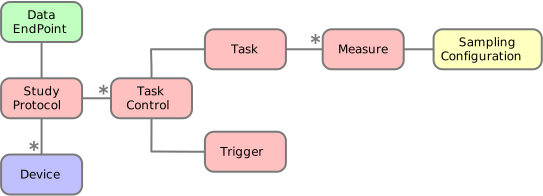
The protocol class
Section titled “The protocol class”A StudyProtocol holds the entire definition of the study to be done, including the owner and name of the study, where to store the data, and which “primary device” that is responsible for data collection.
// Create a study protocol storing data in a local SQLite database.final protocol = SmartphoneStudyProtocol(  ownerId: 'abc@dtu.dk',  name: 'Track patient movement',  dataEndPoint: SQLiteDataEndPoint(),);
// Define which devices are used for data collection.// In this case, it is only a smartphone working as the primary device.var phone = Smartphone();protocol.addPrimaryDevice(phone);A first protocol
Section titled “A first protocol”In CAMS, sensing is configured in a SmartphoneStudyProtocol.
You can use the Dart API to create a protocol directly in your app like this:
final phone = Smartphone();final protocol = SmartphoneStudyProtocol( ownerId: 'AB', name: 'Tracking steps, light, screen, and battery', dataEndPoint: SQLiteDataEndPoint(), ) ..addPrimaryDevice(phone) ..addParticipantRole(ParticipantRole('Participant')) ..addTaskControl( DelayedTrigger(delay: const Duration(seconds: 10)), BackgroundTask( measures: [ Measure(type: SensorSamplingPackage.STEP_EVENT), Measure(type: SensorSamplingPackage.AMBIENT_LIGHT), Measure(type: DeviceSamplingPackage.SCREEN_EVENT), Measure(type: DeviceSamplingPackage.BATTERY_STATE), ], ), phone, Control.Start, );This example create a study protocol that collects steps, light, and screen and battery events from the phone, stores this in the local SQLite database. Data sampling “starts” after a delay of 10 seconds.
Examples
Section titled “Examples”Now that we know the study protocol domain model, we’re ready to create the study protocol - which basically just is a list of triggers of tasks with a set of measures. Examples are included below.
final protocol = SmartphoneStudyProtocol( ownerId: 'AB', name: 'Tracking steps, light, screen, and battery', dataEndPoint: SQLiteDataEndPoint(), ) ..addPrimaryDevice(Smartphone()) ..addParticipantRole(ParticipantRole('Participant')) ..addTaskControl( ImmediateTrigger(), BackgroundTask( measures: [ Measure(type: SensorSamplingPackage.STEP_EVENT), Measure(type: SensorSamplingPackage.AMBIENT_LIGHT), Measure(type: DeviceSamplingPackage.SCREEN_EVENT), Measure(type: DeviceSamplingPackage.BATTERY_STATE), Measure(type: DeviceSamplingPackage.DEVICE_INFORMATION), ], ), );final protocol = SmartphoneStudyProtocol(...);var phone = Smartphone();protocol.addPrimaryDevice(phone);
// Collect timezone info every time the app restarts.protocol.addTaskControl( ImmediateTrigger(), BackgroundTask(measures: [Measure(type: DeviceSamplingPackage.TIMEZONE)]), phone,);
// Collect device info only once, when this study is deployed.protocol.addTaskControl( OneTimeTrigger(), BackgroundTask( measures: [Measure(type: DeviceSamplingPackage.DEVICE_INFORMATION)], ), phone,);
// Collect IMU data every 10 secs for 1 sec.protocol.addTaskControl( PeriodicTrigger(period: const Duration(seconds: 10)), BackgroundTask( measures: [ Measure(type: SensorSamplingPackage.ACCELERATION), Measure(type: SensorSamplingPackage.ROTATION), ], duration: const Duration(seconds: 1), ), phone,);
// Check periodically for a condition to trigger the taskprotocol.addTaskControl( ConditionalPeriodicTrigger( period: Duration(seconds: 20), triggerCondition: () => ('jakob'.length == 5), ), BackgroundTask() ..addMeasure(Measure(type: DeviceSamplingPackage.DEVICE_INFORMATION)), phone,);final protocol = SmartphoneStudyProtocol(...);var phone = Smartphone();protocol.addPrimaryDevice(phone);
// Add a cron job that triggers an app task every day at 11:45// This will show a notification in the OS and when the user click this// the app task is triggered and the device information is collected.protocol.addTaskControl( CronScheduledTrigger.parse(cronExpression: '45 11 * * *'), AppTask( type: AppTask.SENSING_TYPE, title: "Click here to collect device information", measures: [Measure(type: DeviceSamplingPackage.DEVICE_INFORMATION)], notification: true, ), phone,);The protocol is deployed and run by the runtime.