
Data transfer
The watch buffers locally and transfers every 15 minutes by default. Each record includes the timestamp given by the watch.
carp_aware_package adds an Apple Watch as a data source to a
CARP Mobile Sensing (CAMS) study. The watch collects
motion, heart rate, location, sound and more while the participant wears it
(including when the phone app is closed) and hands the data to the phone a few
times an hour.
The flutter sampling package wraps the AWARE watchOS sensing framework by Yuuki Nishiyama (The University of Tokyo).
Nine measure types, within dk.carp.watch.aware namespace:
| Measure type | Data class | What it holds |
|---|---|---|
dk.carp.watch.aware.motion |
AppleWatchMotion |
Acceleration, attitude, gravity, rotation rate, user acceleration |
dk.carp.watch.aware.heartrate |
AppleWatchHeartRate |
Heart rate in BPM, read from HealthKit |
dk.carp.watch.aware.battery |
AppleWatchBattery |
Battery level and charging state of the watch |
dk.carp.watch.aware.location |
AppleWatchLocation |
Latitude, longitude, altitude, speed, course |
dk.carp.watch.aware.heading |
AppleWatchHeading |
Compass heading and geomagnetic field |
dk.carp.watch.aware.bluetooth |
AppleWatchBluetooth |
Nearby Bluetooth devices seen by the watch |
dk.carp.watch.aware.ambientnoise |
AppleWatchAmbientNoise |
Noise level in decibel |
dk.carp.watch.aware.audiolabel |
AppleWatchAudioLabel |
Sound classification labels (speech, laughter, …) |
dk.carp.watch.aware.device |
AppleWatchDeviceInfo |
Watch model, watchOS version, and the phone it is paired with |
Every field of every type is documented in Measure Types & Data.
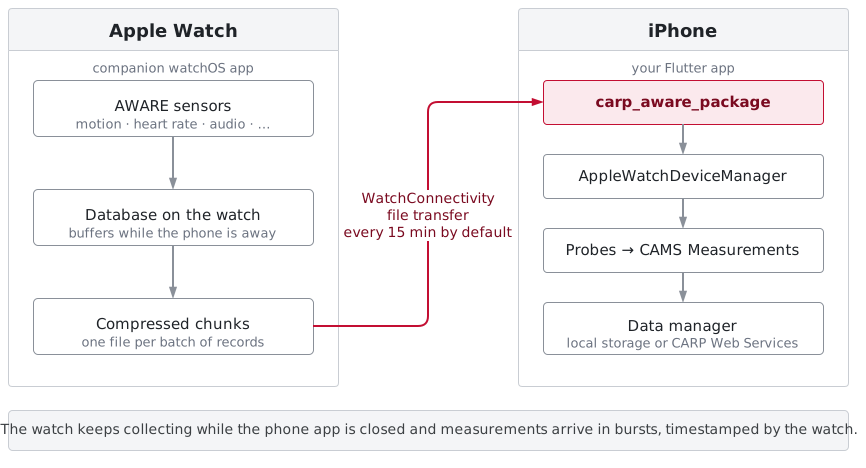
Data transfer
The watch buffers locally and transfers every 15 minutes by default. Each record includes the timestamp given by the watch.
Background collection
The watch keeps collecting when it is out of range, and when the phone app has been killed. iOS wakes your app in the background to receive the files.
Protocol configuration
Sampling rates and which sensors run are part of the study protocol. Deploying a new protocol from CARP Web Services reconfigures the watch.
How It Works walks through the full path from a sensor reading on the watch to a row in your data set.
| iOS deployment target | 16.0 |
| watchOS deployment target | 8.0 |
| Flutter | 3.29 or newer (Swift Package Manager support) |
| Dart SDK | 3.8 or newer |
| Testing | A physical iPhone with a paired Apple Watch |
The watchOS sensing framework wrapped by this package is
com.awareframework.ios.sensor.applewatch
by Yuuki Nishiyama (The University of Tokyo), available under the Apache License 2.0.
If this framework supports your research, please cite:
Y. Nishiyama and K. Sezaki, “Smartwatch-Based Sensing Framework for Continuous Data Collection: Design and Implementation”, UbiComp/ISWC ’23 Adjunct, pages 620–625, ACM, 2023.