Install Context
Add the package
Section titled “Add the package”To use this package, add the following to your pubspec.yaml file. Note that this package only works together with carp_mobile_sensing.
dependencies: carp_mobile_sensing: ^latest carp_context_package: ^latest ...Permissions
Section titled “Permissions”This context package makes use of what Apple and Google denote as sensitive information, especially location and physical activity. Therefore it is important to configure the app to access this information. Please read carefully the [instructions on how to set up the permission_handler plugin](https://github.com/carp-dk/carp.sensing-flutter/tree/main/packages/carp_context_package/ https://pub.dev/packages/permission_handler#setup) - both for Android and iOS.
Android
Section titled “Android”Add the following to your app’s AndroidManifest.xml file located in android/app/src/main:
<manifest xmlns:android="http://schemas.android.com/apk/res/android"    package="<your_package_name>"    xmlns:tools="http://schemas.android.com/tools">
   ...
    <uses-permission android:name="android.permission.ACCESS_FINE_LOCATION" />    <uses-permission android:name="android.permission.ACCESS_COARSE_LOCATION" />    <uses-permission android:name="android.permission.ACCESS_BACKGROUND_LOCATION" />    <uses-permission android:name="android.permission.FOREGROUND_SERVICE_LOCATION" />
</manifest>In order to use Location and Activity Recognition, you need to set your minimum deployment target to iOS 15.0 or later. Furthermore, you need to enable the macros from the [permission_handler](https://github.com/carp-dk/carp.sensing-flutter/tree/main/packages/carp_context_package/ https://pub.dev/packages/permission_handler#setup) plugin. Please see the [setup instructions](https://github.com/carp-dk/carp.sensing-flutter/tree/main/packages/carp_context_package/ https://pub.dev/packages/permission_handler#setup) for iOS.
Change the post_install part of your ios/Podfile:
platform :ios, '15.0'

...
post_install do |installer|  installer.generated_projects.each do |project|    project.targets.each do |target|      target.build_configurations.each do |config|          config.build_settings['IPHONEOS_DEPLOYMENT_TARGET'] = '15.0'      end    end  end  installer.pods_project.targets.each do |target|    flutter_additional_ios_build_settings(target)
    target.build_configurations.each do |config|      config.build_settings['GCC_PREPROCESSOR_DEFINITIONS'] ||= [        '$(inherited)',        # See https://pub.dev/packages/permission_handler#setup - under iOS setup
        # The context package uses the following permissions:        'PERMISSION_LOCATION=1',      # Location access        'PERMISSION_NOTIFICATIONS=1', # CARP Mobile Sensing uses notifications        'PERMISSION_SENSORS=1',       # Core Motion sensors on iOS (pedometer)      ]    end  endend
Add the following permissions in the Info.plist file located in ios/Runner (use your own text for explanation in the <string> tags):
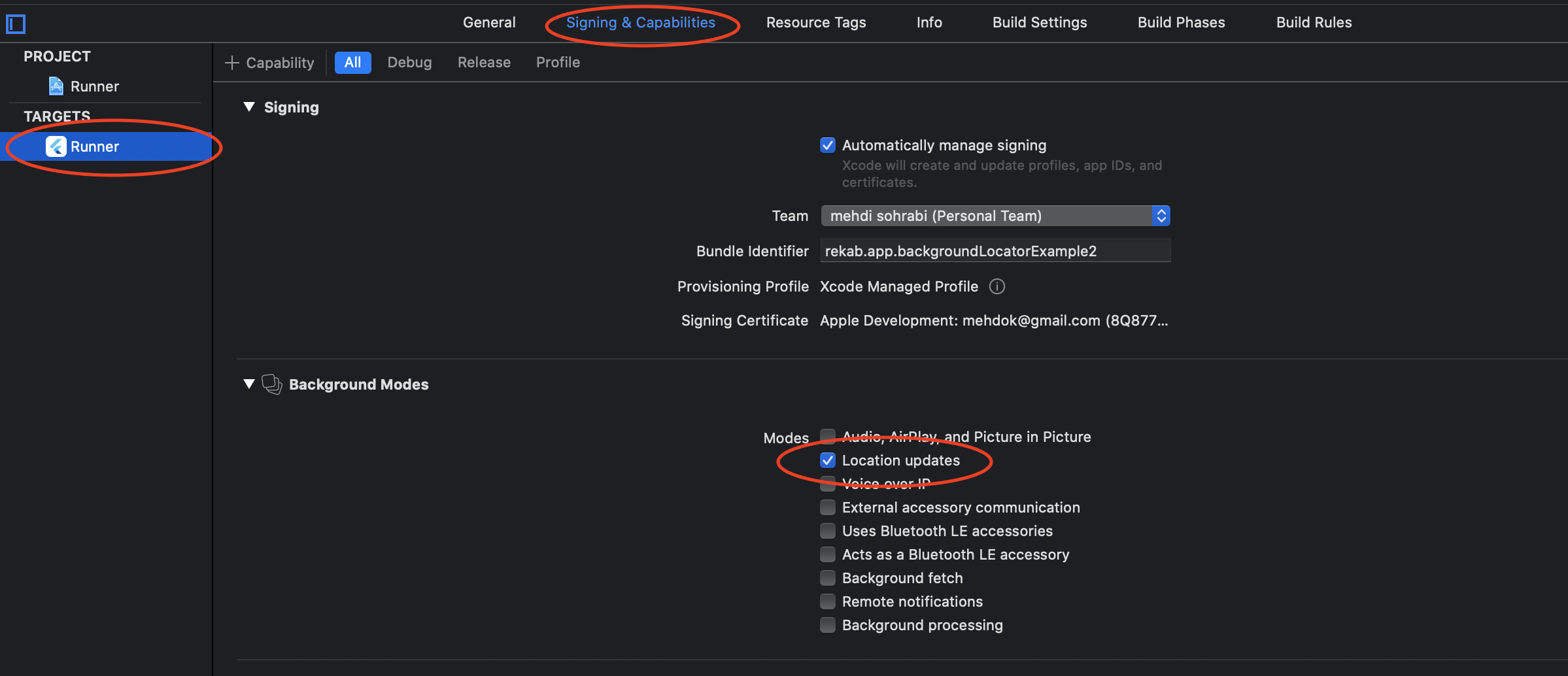
<plist version="1.0"><dict> ... <key>NSLocationWhenInUseUsageDescription</key> <string>Uses the location API to record location.</string> <key>NSLocationAlwaysUsageDescription</key> <string>Uses the location API to record location.</string> <key>NSLocationAlwaysAndWhenInUseUsageDescription</key> <string>Uses the location API to record location.</string> <key>NSMotionUsageDescription</key> <string>Detects activity.</string> <key>UIBackgroundModes</key> <array> <string>fetch</string> <string>location</string> </array></dict></plist>Also - make sure to activate Background mode for your Runner. Open XCode and go to “Signing & Capabilities”. Add the “Background Modes” section and add “Location updates” to the list: