
Task List
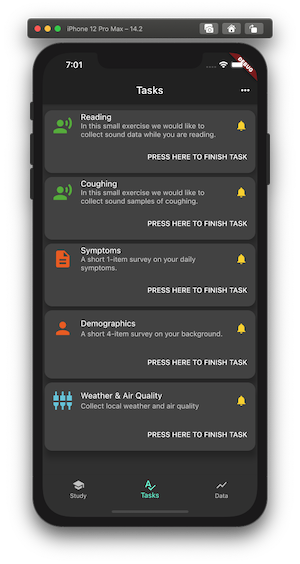
An AppTask is what you write in the protocol. A UserTask is the runtime copy that goes into the queue when the trigger fires. Your UI reads the queue from the AppTaskController singleton.
| File | What is in it |
|---|---|
runtime/app_task_controller.dart |
AppTaskController: the queue, userTaskQueue and userTaskEvents |
runtime/user_tasks.dart |
UserTask, its states, and UserTaskFactory |
runtime/executors/task_executors.dart |
AppTaskExecutor: enqueues the user task |
infrastructure/services/persistence_service.dart |
Keeps the queue across restarts (task_queue table) |
Define an AppTask in protocol
Configure an AppTask with task metadata plus one or more background measures.
Trigger and enqueue a UserTask
When triggered, CAMS creates a UserTask and puts it on the task queue in the AppTaskController.
Render and execute in app UI
The app listens to the task queue and renders the task list and task for the user in the app, providing callback methods for starting, completing, or canceling tasks.
Handle completion and notifications
Task state transitions and local notifications are handled through the runtime APIs.
This page uses the PulmonaryMonitor app as a running example.
Task List
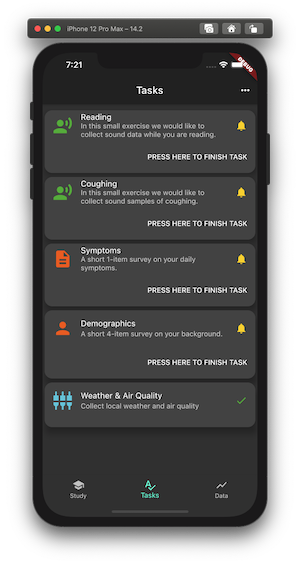
Task Done
When an AppTask is triggered, it is executed by an AppTaskExecutor:
Based on the AppTask configuration, a UserTask is created. This user task embeds a BackgroundTaskExecutor which, later (when the app task is started), is used to collect the measures.
This user task is enqueued in the AppTaskController. The AppTaskController is a singleton and is core to the handling of AppTasks, including creating notifications.
All triggered user tasks are available in the userTaskQueue for custom rendering in the app.
The user task has set of call-back methods for marking the task started, done, canceled, expired, all of which are called by the app.
When the user tak is started it uses a embedded BackgroundTaskExecutor to collect the measures. This background data collection is stopped when the task is marked as done or, if one-time measures, when then measures are collected.
AppTaskController and user task queueIn the PulmonaryMonitor, access to enqueued tasks is handled in sensing_bloc.dart.
Use the userTaskQueue property on AppTaskController to access the queue:
List<UserTask> get tasks => AppTaskController().userTaskQueue;An app can also listen to events on the user task queue:
AppTaskController().userTaskEvents.listen((event) { switch (event.state) { case UserTaskState.initialized: // break; case UserTaskState.enqueued: // break; case UserTaskState.dequeued: // break; case UserTaskState.started: // break; case UserTaskState.done: // break; case UserTaskState.canceled: // break; case UserTaskState.expired: // break; case UserTaskState.undefined: // break; } });Enqueued user tasks can be rendered in any app-specific UI. In the PulmonaryMonitor app, the task list shown above is implemented in task_list_page.dart.
For example, to build the scrollable list view of cards, the following StreamBuilder is used:
class TaskListPageState extends State<TaskListPage> {  TaskListViewModel get model => widget.viewModel;
  @override  Widget build(BuildContext context) => Scaffold(    appBar: AppBar(title: const Text('Tasks')),    body: ListenableBuilder(      listenable: model,      builder: (BuildContext context, Widget? child) => Scrollbar(        child: ListView.builder(          itemCount: model.tasks.length,          padding: const EdgeInsets.symmetric(vertical: 8.0),          itemBuilder: (context, index) =>              getTaskCard(context, model.tasks[index]),        ),      ),    ),  );  ...}
To render the UI of each cards representing a user task, the following StreamBuilder is used:
Widget getTaskCard(BuildContext context, UserTask userTask) => Center(  child: Card(    elevation: 10,    shape: RoundedRectangleBorder(borderRadius: BorderRadius.circular(15.0)),    child: StreamBuilder<UserTaskState>(      stream: userTask.stateEvents,      initialData: UserTaskState.initialized,      builder: (context, AsyncSnapshot<UserTaskState> snapshot) => Column(        mainAxisSize: MainAxisSize.min,        children: <Widget>[          ListTile(            leading: taskTypeIcon[userTask.type],            title: Text(userTask.title),            subtitle: Text(userTask.description),            trailing: taskStateIcon[userTask.state],          ),          (userTask.availableForUser)              ? OverflowBar(                  children: <Widget>[                    TextButton(                      child: const Text('PRESS HERE TO FINISH TASK'),                      onPressed: () {                        userTask.onStart(); // Mark the task as started.
                        // Check if the task has a UI widget to be shown                        if (userTask.hasWidget) {                          // Push the task widget to the app.                          // Note that the widget is responsible for calling the onDone method when the task is done.                          Navigator.push(                            context,                            MaterialPageRoute<Widget>(                              builder: (context) => userTask.widget!,                            ),                          );                        } else {                          // A non-UI sensing task that collects sensor data.                          // Automatically stops after 10 seconds.                          Timer(                            const Duration(seconds: 10),                            () => userTask.onDone(),                          );                        }                      },                    ),                  ],                )              : const Text(""),        ],      ),    ),  ),);
When the user taps PRESS HERE TO FINISH TASK, the user task is started using the userTask.onStart() method. If the task has a widget, that widget is pushed to the UI. For a non-UI sensing task, it starts and runs for 10 seconds.
A UserTask has callback methods that can be called by the app:
| Callback | Purpose |
|---|---|
onStart |
Starts the task and starts collecting defined measures. |
onCancel |
Cancels the task. |
onDone |
Marks the task as done and typically stops measure collection. |
onExpired |
Handles expiration and removes the task from the queue. |
onNotification |
Called when the user taps the OS notification for this task. |
An app task can be configured with notification. If enabled, a local notification is sent with the task title and description.
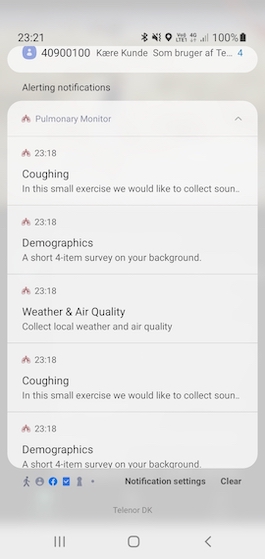
This notification setup uses flutter_local_notifications and requires app-level configuration. See Install and Configure.
CAMS is extensible, so you can add custom app tasks by creating new UserTask types and registering them.
This is similar to extending measures and probes, as described in Extending CAMS.
The AudioUserTask in the Pulmonary Monitor is an example of a custom app task.
Its custom user task implementation is in audio_user_task.dart:
/// A user task handling audio recordings.////// The [widget] returns an [AudioMeasurePage] that can be shown on the UI.////// When the recording is started (calling the [onRecord] method),/// the background task collecting sensor measures is started.class AudioUserTask extends UserTask {  static const String AUDIO_TYPE = 'audio';
  final StreamController<int> _countDownController =      StreamController.broadcast();  Stream<int> get countDownEvents => _countDownController.stream;  Timer? _timer;
  /// Duration of audio recording in seconds.  int recordingDuration = 10;
  AudioUserTask(super.executor, [this.recordingDuration = 10]);
  @override  bool get hasWidget => true;
  @override  Widget? get widget => AudioMeasurePage(audioUserTask: this);
  /// Callback when recording is to start.  /// When recording is started, background sensing is also started.  void onRecord() {    backgroundTaskExecutor.start();
    // start the countdown, once tick pr. second.    _timer = Timer.periodic(const Duration(seconds: 1), (_) {      _countDownController.add(--recordingDuration);
      if (recordingDuration <= 0) {        _timer?.cancel();        _countDownController.close();
        // pause the background sensing and mark this task as done        backgroundTaskExecutor.pause();        super.onDone();      }    });  }}
To create and enqueue the right user-task type, CAMS uses a UserTaskFactory. Hence, you need to define such a user task factory for your custom types. For example, the factory for AudioUserTask looks like this:
/// A factory that can [create] a [UserTask] based on the type of app task./// In this case an [AudioUserTask].class PulmonaryUserTaskFactory implements UserTaskFactory {  @override  List<String> types = [AppTask.AUDIO_TYPE];
  @override  UserTask create(AppTaskExecutor executor) => switch (executor.task.type) {    AppTask.AUDIO_TYPE => AudioUserTask(executor),    _ => BackgroundSensingUserTask(executor),  };}